v1.1.0 Now Available — Large Files Finder, Fix Internet, Focus Mode & more.  Get the free download →
Windows System Utility v1.1  •  Insights Suite: Recommendations, Profiles & Scheduled Maintenance

Your PC, Optimized.

A comprehensive Windows system utility with real-time monitoring, intelligent cleanup, Health Score diagnostics, App & Bloat Manager, startup impact scoring, cybersecurity scanning, and wellness tracking — in a sleek terminal-style interface.

🌍 site visits downloads
MTT Windows Infinite Optimizer Dashboard
13+
Cleanup Categories
18+
Feature Modules
100
Health Score Engine
Site Visits
Downloads

Everything You Need

18+ powerful modules working together to keep your Windows system fast, clean, and secure — now with an Insights suite: Recommendations, Profiles, and Scheduled Maintenance.

📊

Real-Time Dashboard

Live CPU, memory, and disk usage with animated progress bars. Top 5 processes by resource use, system uptime, and quick scan summaries at a glance.

CPU Memory Disk Live
🧹

System Cleaner

Scan and remove temp files, browser caches, thumbnails, error reports, and more across 13+ categories. Dry-run preview before committing — reclaim gigabytes safely.

13+ Categories Dry Run Deep Clean
📁

File Organizer

Detect duplicates via MD5 hashing, zero-length files, and leftover installers. Auto-sort Downloads by type or age, move screenshots, and restore with the undo log.

Duplicates Downloads Rules Undo
🔧

Registry Optimizer

Scan the Windows registry for invalid entries, orphaned keys, and startup bloat. Get recommendations and one-click fixes with an advanced confirmation guard.

Registry Auto-Fix Startup
💻

Process Monitor

Live process list sorted by CPU and memory. Manage startup items from HKCU, HKLM, and the Startup folder with enable/disable toggles and reboot controls.

Processes Startup Items Real-Time
💚

Wellness Monitor

40-minute break reminders with audio alerts. Night Light scheduling, screen brightness tips, and Focus Mode with a built-in Pomodoro (25 min work / 5 min break) timer.

Break Timer Pomodoro Night Light
🛡

Cybersecurity Scanner

Scan 11 common ports for vulnerabilities, monitor active network connections, display your public IP, and detect open-port security risks.

Port Scan Connections IP
🖥️

System Information

Detailed hardware specs, RAM details with upgrade compatibility guide, motherboard info, installed software list, and deep file-type analysis.

RAM Upgrade Hardware Analysis

Task Scheduler

Automate daily system cleanup at 5 PM and weekly registry scans. Set it and forget it — your system stays clean on a schedule, automatically.

Daily Weekly Auto
⚙️

Settings Control

Toggle every cleanup category on or off. Configure break reminder intervals, scheduler timing, and all feature preferences with full persistence.

Toggles Persist Custom
🚀

Speed Up

Startup Manager with Impact Scoring — each program rated High / Medium / Low with Safe-to-Disable categories. Launch Visual Effects presets and Power Mode from one panel.

Impact Scoring Power Mode Visual Effects
📦

Large Files Finder

Scan Downloads, Desktop, Videos, and Documents for files above a custom size threshold. Preview, delete, or archive to a dedicated folder — with dry-run support.

Custom Threshold Archive Dry Run
🌐

Fix Internet

One-click network repair: resets Winsock, flushes DNS cache, releases and renews your IP, and resets the TCP/IP stack — with live streaming terminal output.

Winsock Reset DNS Flush TCP/IP Reset
❤️

System Health Score

Instant 0–100 health rating computed from CPU load, RAM pressure, disk usage, uptime, and heavy background processes. Clickable recommendations guide you to the right fix.

Score Ring Recommendations Auto-Refresh
📦

App & Bloat Manager

Scans your installed programs and flags likely bloatware by publisher, name, and size. Filter by "Likely Bloat" or "Large Apps", launch the uninstaller, export to CSV — fully sortable.

Bloat Detection CSV Export Uninstall
🔍

Deep File Scanners

Four specialist tools in one: Broken Shortcut Finder, Empty Folder Remover, Folder Size Explorer, and Desktop Wizard — all with preview and safe-delete flows.

Broken Shortcuts Empty Folders Folder Sizes
💡

Recommendations Engine

AI-powered system advisor that evaluates CPU, RAM, disk, uptime, and habits to surface actionable tips. Dismiss, snooze, or filter by category and priority. Exports to JSON.

Priority Scoring Snooze Export
🎭

Profiles & Presets

Switch between Performance, Work, Night Comfort, and Battery Saver modes instantly — or build fully custom profiles. One-click restore to previous state.

Built-in Presets Custom Profiles Restore
📅

Scheduled Maintenance

8 built-in recurring tasks — weekly temp scans, monthly duplicate checks, download reminders, and health scans. Add custom tasks. Full history log with export. Safe scan-only defaults.

Auto-Schedule Run Now History Log
What's Under the Hood

A closer look at the most powerful tools inside MTT Windows Infinite Optimizer — built for real-world performance problems, not just flashy dashboards.

Module 01 — Cleaner
🧹

System Cleaner:
13+ Junk Categories, Zero Guesswork

Windows silently accumulates gigabytes of clutter — temp files, browser caches, Windows Update residue, error dump files, thumbnail databases, and more. The System Cleaner targets all of it with surgical precision.

  • Cleans %TEMP%, Windows Temp, Prefetch, and Recent files folders
  • Removes leftover Windows Update packages from SoftwareDistribution
  • Purges browser caches for Chrome, Edge, Firefox, and Brave
  • Wipes thumbnail caches, Recycle Bin contents, and crash dump logs
  • Dry-run mode: preview exactly what will be deleted before committing
  • Per-category toggles in Settings so you never touch what you want to keep
[SCAN] Analyzing 13 categories...
%TEMP% files         2.1 GB
Windows Update cache  4.8 GB
Browser caches       1.3 GB
Thumbnails DB        340 MB
Crash dumps          890 MB
Prefetch & recent    220 MB
Total recoverable: 9.6 GB
[DRY RUN] No files deleted yet — confirm to clean
13+
Categories
9.6
Avg GB saved
100%
Safe dry run
Module 02 — Speed Up
🚀

Startup Manager:
Impact-Scored Boot Optimization

Most Windows PCs slow down over time because every app you install adds itself to your startup. The Startup Manager gives you full visibility and control — with an intelligence layer that tells you what's safe to disable.

  • Reads all three startup sources: HKLM, HKCU, and the Startup folder
  • Each entry rated High / Medium / Low boot impact
  • Badges: Safe to Disable, System, or Caution — no guessing required
  • One-click enable/disable with registry write — instant effect on next boot
  • All changes tracked in the Undo / Restore Log — revert anytime
  • Reboot prompt after changes so nothing is left in an inconsistent state
Startup Items — Impact Analysis
OneDrive.exe HIGH • SAFE
Spotify.exe MED • SAFE
SecurityHealth.exe LOW • SYSTEM
Discord.exe HIGH • SAFE
3
Sources Read
Undo Log
Module 03 — Security
🛡️

Cybersecurity Scanner:
Know What's Exposed

Most people have no idea what ports their PC is broadcasting to the internet, or which processes are maintaining active outbound connections. The Cybersecurity Scanner makes the invisible completely visible.

  • Scans 11 common vulnerability ports (FTP, SSH, Telnet, HTTP, SMB, RDP, and more)
  • Lists every active network connection with remote IP, port, and process name
  • Displays your current public IP address with one-click lookup
  • Flags open ports with a risk rating and explains the potential threat
  • Fix Internet tool resets Winsock, flushes DNS, and renews your IP in one click
  • Streaming terminal output so you watch the fix happen in real time
[PORT SCAN] Scanning 11 common ports...
CLOSED  Port 21   (FTP)
CLOSED  Port 22   (SSH)
CLOSED  Port 23   (Telnet)
OPEN    Port 445  (SMB)  ⚠ Risk: HIGH
CLOSED  Port 3389 (RDP)
⚠ 1 open port detected. SMB exposure can allow
  ransomware propagation on local network.
Public IP: 203.x.x.x  (click to lookup)
Module 04 — File Organizer
📁

File Organizer:
Smart Cleanup for Every Corner

Downloads folders balloon. Duplicates silently eat disk space. Old installers pile up. The File Organizer handles all of it — with MD5-based duplicate detection, smart Downloads rules, and a safety net undo log for every action it takes.

  • MD5 duplicate finder: identical files detected even with different names
  • Zero-length file scanner — removes ghost files that waste directory entries
  • Leftover installer cleanup (.exe, .msi, .msix in common folders)
  • Downloads Rules: auto-group by type (Images, Docs, Videos, Code), archive old files by age threshold, move screenshots to a dedicated folder
  • Full dry-run preview before any file is moved or deleted
  • Undo / Restore Log: every move is logged and reversible with one click
Downloads Rules — Preview
📸 Screenshots moved23 files
🎬 Videos grouped11 files
📄 Docs grouped38 files
🗃️ Archived (90+ days old)54 files
🔁 Duplicates found1.4 GB
[DRY RUN MODE] — No changes applied yet
Module 05 — Insights
💡

Recommendations Engine:
Your AI System Advisor

Instead of making you dig through menus, the Recommendations Engine continuously evaluates your system and tells you exactly what to do and why. No technical knowledge required — just follow the priority list.

  • Scores CPU load, RAM pressure, disk usage, uptime, and background habits
  • Surfaces Critical, High, and Normal priority tips with plain-English explanations
  • Filter by category: Performance, Security, Storage, Wellness
  • Dismiss permanently or snooze for 1–24 hours and revisit later
  • Every action tracked in history with timestamps — export to JSON
  • Paired with Profiles & Presets: one-click apply the recommended optimization mode
Active Recommendations
Critical • Performance
CPU sustained above 85% for 20+ minutes
Check Process Monitor for runaway tasks
High • Storage
Disk at 91% capacity — clean up now
Run System Cleaner to recover 9+ GB
Normal • Wellness
No break taken in 3 hours
Enable Focus Mode for structured Pomodoro sessions
Module 06 — Wellness
💚

Wellness Monitor:
Because Your Health Matters Too

System optimization shouldn't come at the cost of your own wellbeing. The Wellness Monitor tracks your screen time, eye strain, and focus habits — and nudges you toward healthier computing with tools that actually work on Windows.

  • Break Timer: 40-minute reminders with a gentle audio alert and countdown display
  • Pomodoro Focus Mode: 25-minute work sprints / 5-minute recovery cycles — auto-cycles until you stop
  • Night Light scheduling: set warm tone hours directly, synced with Windows built-in settings
  • Screen brightness guidance with quick preset links for day, evening, and late-night
  • Display settings deep link — no hunting through Control Panel
  • All wellness settings persist across sessions — configured once, always running
Focus Mode — Pomodoro Active
18:32
WORK SESSION
3 sessions done
5min break next
Night Light
9 PM → 7 AM
Break interval
Every 40 min

New in This Release

Six modules added across two releases — scanner improvements, startup intelligence, and a full Insights suite.

❤️
New Module

System Health Score

A live 0–100 score on the dashboard computed from CPU, RAM, disk, uptime, and running processes. Color-coded ring + clickable recommendations that jump you straight to the fix.

📦
New Module

App & Bloat Manager

Registry-powered installed app scanner with automatic bloat detection. Filter, sort by size or name, launch the native uninstaller, open install folders, or export everything to CSV.

🚀
Enhanced

Startup Impact Scoring

Every startup item now shows a High / Medium / Low impact rating with a Safe-to-Disable or System/Caution badge — so you know exactly what to turn off.

🔍
Enhanced

4 New Deep Scanners

Broken Shortcut Finder, Empty Folder Remover, Folder Size Explorer, and Desktop Wizard added to the Cleaner and File Organizer pages — each with preview, safe-delete, and demo mode.

💡
New Module

Recommendations Engine

Real-time system advisor that scores your CPU, RAM, disk, uptime, and habits to surface prioritized actions — filter by category, snooze or dismiss, and export your history to JSON.

🎭
New Module

Profiles & Presets

Four built-in optimization profiles — Performance, Work, Night Comfort, Battery Saver — plus full custom profile creation. One-click apply with automatic restore-previous safety net.

📅
New Module

Scheduled Maintenance

8 pre-built maintenance tasks run on daily, weekly, or monthly schedules. Toggle each on or off, run any task on demand, view the full history log, and add custom reminder tasks.

AI Is Filling Up Your PC —
And Windows Isn’t Keeping Up

Artificial intelligence tools are rapidly becoming part of everyday computing. But there’s a growing problem most people don’t realize yet.

From AI assistants and image generators to local large language models and AI-powered creative tools, modern software is increasingly dependent on heavy data processing and large memory footprints. AI workloads consume enormous amounts of memory and temporary storage — and Windows doesn’t automatically manage that buildup very well. Over time, this can leave your PC sluggish, cluttered, and constantly fighting for resources.

🤖 The Hidden Cost What AI Apps Generate Behind the Scenes

AI models are fundamentally different from traditional applications. Many must load large datasets or model weights directly into memory before they can run. Even modest local models can require 16 GB of RAM or more. And that’s just the start — they also constantly write to disk:

📁
Large Temporary Caches
Inference Data & Buffers
💾
Model Checkpoints
📋
Logs & Artifacts
🖥️
GPU / CPU Memory Buffers
🧠
Context Caches (10s of GB)
Imagine running multiple AI tools simultaneously — AI copilots, AI design tools, AI code assistants, AI transcription — all creating their own caches and temporary files. Your computer starts drowning in data.
⚠️
🪟 The Problem Windows Wasn’t Designed for the AI Era

Windows provides basic tools like Disk Cleanup and Storage Sense — but they were designed long before modern AI workloads existed. Add AI into the mix and the accumulation problem gets dramatically worse. Common symptoms include:

🐢
Slower System PerformanceCPU throttles as RAM fills up with cached model data
Apps Take Longer to LaunchDisk thrashing from swap files overwhelms the SSD
📈
Increased RAM Usage & PagingMemory pressure forces Windows to page constantly
💿
Reduced Available StorageAI artifact folders silently grow to dozens of GB
💥
Unexpected Crashes or FreezesCorrupted caches conflict with running applications
🔄
Background Bloat CompoundsStartup programs accumulate and consume idle resources
🧹 The Solution Why Regular Cache Cleaning Matters More Than Ever

In the AI era, routine maintenance isn’t optional anymore. Keeping your system optimized requires regularly removing AI model caches, temporary runtime data, orphaned install files, and memory-intensive background leftovers. Cleaning these up regularly can:

✔️
Restore Lost Storage SpaceReclaim gigabytes from temp files, caches, and AI artifacts
🧠
Reduce RAM PressureFree working memory so AI tools get the headroom they need
Improve Application PerformanceFaster launches, smoother inference, fewer freezes
🛡️
Prevent Corrupted CachesStale cache files can crash apps or cause silent errors
🤖
Keep AI Tools Running SmoothlyA clean system is a faster, more responsive AI workstation
🚀
Speed Up Everything ElseLess background noise means your whole system benefits
Think of it like clearing a workshop after every project. If you keep piling tools and scraps on the workbench, eventually you run out of space to work. Your computer’s memory works the same way.
🛡️

MTT Windows Infinite Optimizer Is Built for the AI Era

As AI becomes part of everyday workflows, keeping your system optimized is no longer optional. MTT Windows Infinite Optimizer automates the cleanup process — with a real-time Health Score, automatic Bloat Detection, Startup Impact Scoring, AI cache cleanup, large file management, and network repair — so your machine stays fast, clean, and ready for anything.

Sponsored
Macro Tech Titan — Tutorials, tools & resources for Windows power users. PC optimization guides, registry tips, security hardening, and productivity deep-dives.
Visit macrotechtitan.com →

See It Working

A terminal-inspired interface designed for power users who want full control over their system.

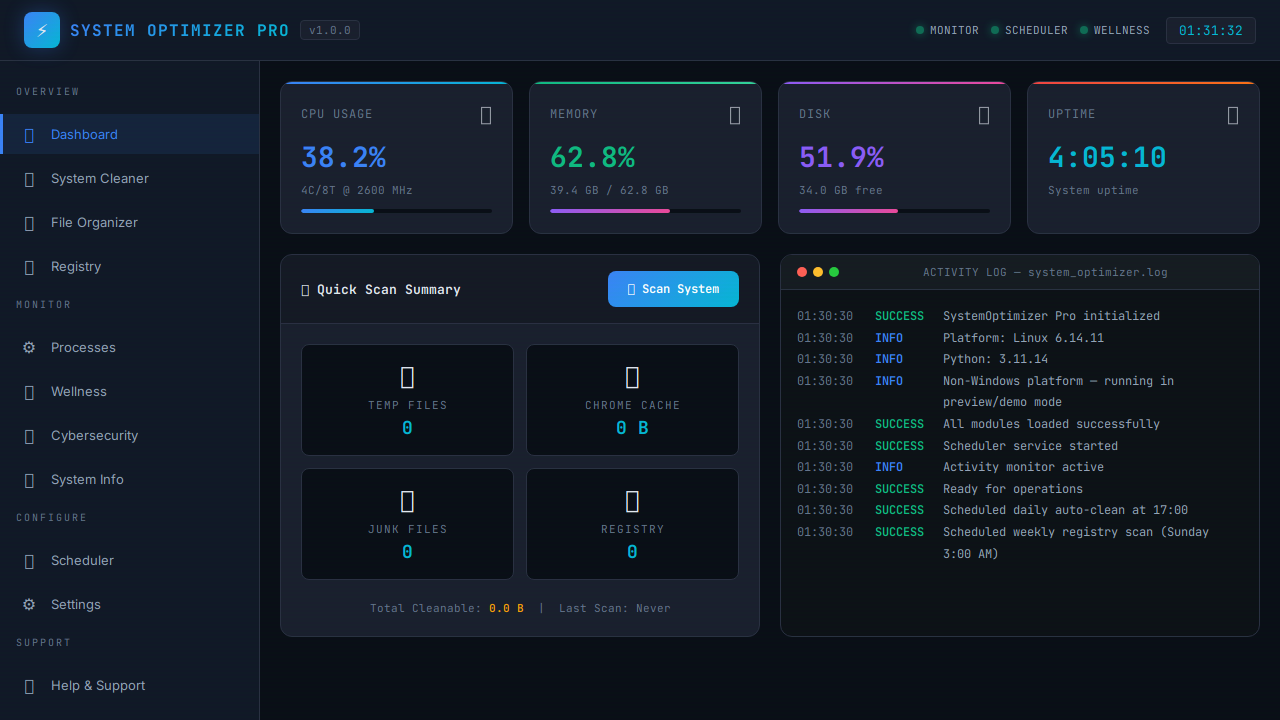
📊 Real-Time System Monitoring

The dashboard provides instant visibility into your system's health with live-updating metrics that refresh every 3 seconds.

  • CPU usage with core count and frequency
  • Memory consumption with used/total breakdown
  • Disk usage with free space indicator
  • System uptime counter
  • Quick scan summary cards
Dashboard

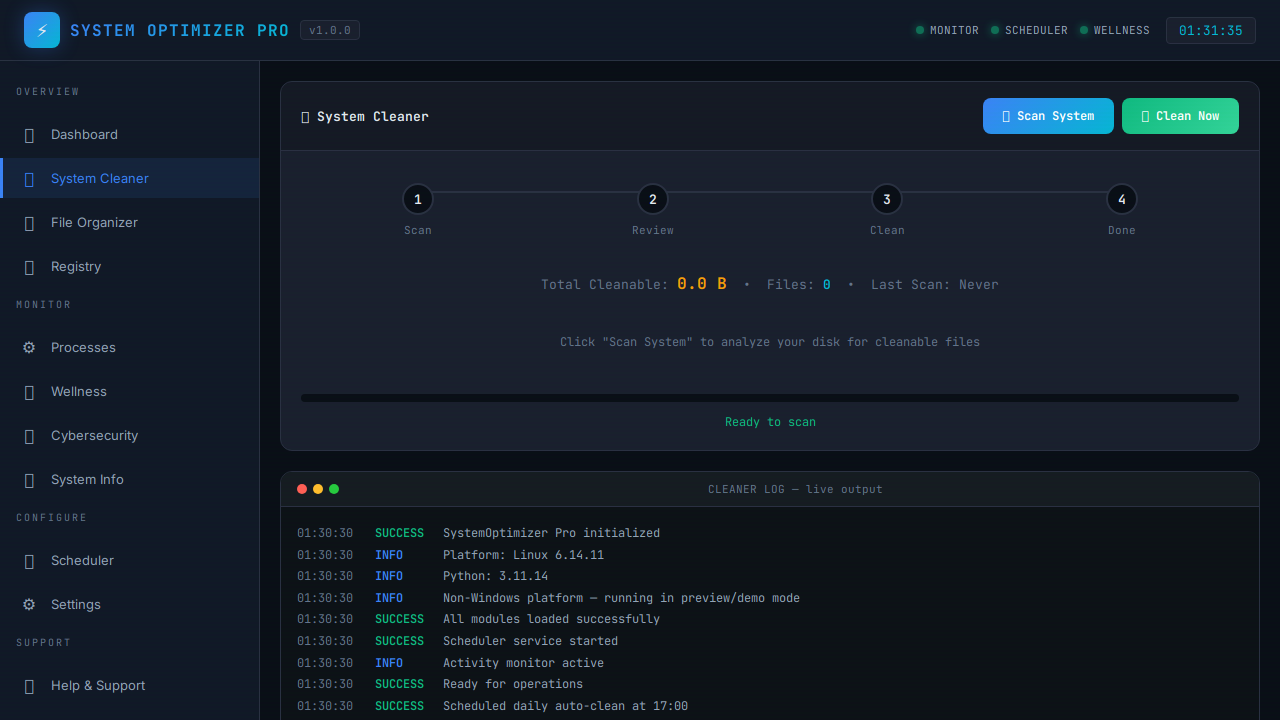
🧹 Intelligent System Cleanup

Scan and clean 13+ categories of Windows clutter with safety ratings for each category.

  • Browser caches (Chrome, Edge, Firefox)
  • System and user temp files
  • Windows error reports and logs
  • DirectX shader cache
  • Recycle Bin and thumbnails
System Cleaner

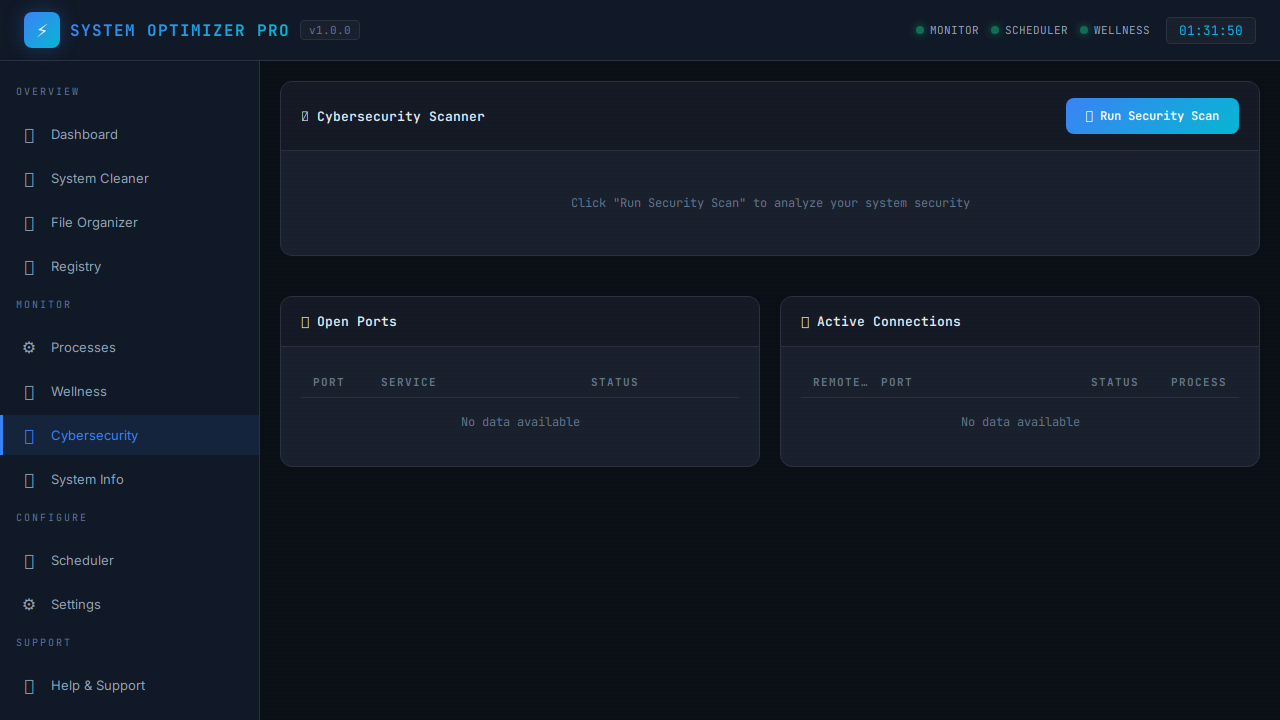
🛡 Cybersecurity Protection

Stay informed about potential security vulnerabilities with comprehensive network scanning.

  • Port scanning on 11 common service ports
  • Active connection monitoring
  • Public IP address display
  • Vulnerability detection and alerts
Cybersecurity

❤️ System Health Score

Know exactly how healthy your PC is at a glance. The Health Score engine evaluates five key system dimensions every time you open the dashboard.

  • 0–100 score ring with color-coded rating
  • Penalties for high CPU, RAM pressure, or disk fill
  • Uptime and heavy-process analysis
  • Clickable recommendations that navigate to the fix
  • One-click refresh, auto-loads on dashboard open
87
♥ System Health Score
✓ CPU usage is healthy (26%)
⚠ RAM at 76% — consider closing tabs
✓ Disk usage normal (54%)

📦 App & Bloat Manager

The first optimizer with built-in bloat intelligence — automatically flags likely junkware based on publisher reputation, app name patterns, and install size.

  • Registry-powered full installed app list
  • Automatic BLOAT badge for suspicious apps
  • Filter by All / Likely Bloat / Large (>500MB)
  • Launch native Windows uninstaller directly
  • Export full list to CSV for auditing
App Manager

Built With Precision

Modern tools and proven libraries for reliability and performance.

🐍
Python 3.11
Backend logic & system access
🌐
Flask
Lightweight web framework
💻
psutil
System monitoring engine
🎨
Terminal UI
JetBrains Mono + scanline effects
🖥
pywebview
Native Windows window
📦
PyInstaller + NSIS
Windows installer packaging
⚡ Powered by Macro Tech Titan

One Dashboard. Total Control.

Everything you need to keep your Windows PC fast, clean, and secure — from one powerful terminal-style interface, built by engineers who actually use Windows.

MTT WindowZen — windowzen.macrotechtitan.com

Ready to Optimize?

Download the Windows installer and take control of your system performance, security, and wellness.

⬇ Download Windows Installer ⚡ Open Dashboard (Demo) ❓ Help & Support

🛠 Also from Macro Tech Titan

MTT Super Dev

Free browser-based tools for I.T., DevOps, SEO & AI — no installs, no signups, instant results.

🌐 Network Info 📡 Ping Tool 🔍 DNS Lookup 🔒 SSL Checker 🚪 Port Scanner 🛡 Blacklist Check 📋 WHOIS Lookup 🔑 JWT Tools 🔗 URL Shortener 📦 QR Generator 🎨 Color Picker 🆔 UUID Generator
Launch Super Dev →

superdev.macrotechtitan.com

MTT Super Dev — Developer Tools